Generate a SnapshotAnalysis
There are two scenarios for generating a SnapshotAnalysis:
- Aggregates all signals within a subsystem.
- Much simpler input, but less control on the signals.
- Requires more specific input but it has finer grained control on the Signals used.
Scenario 1 - SubsystemAnalysis
- Open Scenarios -> Create SubsystemAnalysis
- Select POST Create SubsystemAnalysis using template
- Fill out body with CreateSubsystemAnalysis
- SnapshotEvent 25113
{
  "snapshotCriteria": {
    "idSnapshot": <SnapshotEventId>,
    "minEpochMs": 0,
    "maxEpochMs": 1773719999999
  },
  "vehicleCriteria": {
    "idPackages": [],
    "idVins": [],
    "fleets": []
  }
}
Response
{
    "id": "69b87f4b68c537088b33c023",
    "snapshotAnalysisId": "69b87f4ca9f39c2e0c04522d" // <- reference to the SnapshotAnalysis resource created.
}
Scenario 2 - SnapshotAnalysis
- Open Scenarios -> Create SnapshotAnalysis
- Select POST Create SnapshotAnalysis using template
- Fill out body with a template
{
    "id": "",
    "name": "Customer Demo In Use",
    "public": false,
    "signalExpressions": {
        "expressions": [{
            "key": "s1",
            "name": "custom_synthetic_*1000",
            "expression": "c1251 * 1000"
        },{
            "key": "s2",
            "name": "in_use_egr_vvt_ratio",
            "expression": "c125698 * 1"
        },{
            "key": "s3",
            "name": "in_use_ds02_b1_ratio_synthetic",
            "expression": "c125700 * 1"
        }]
    },
    "sections": [],
    "criteria": {
        "vehicleCriteria": {
            "idPackages": [],
            "idVins": [],
            "fleets": []
        },
        "snapshotCriteria": {
            "idSnapshot": 25113,
            "minEpochMs": 0,
            "maxEpochMs": 1773719999999
        }
    }
}
- Send the request using Postman.
Response
{
    "id": "69b87f88a9f39c2e0c04522f", // <- reference to the SnapshotAnalysis resource created.
    "processingState": {
        "errorMessage": "N/A",
        "status": "submitted"
    },
    "template": {
        "createdBy": "",
        "criteria": {
            "snapshotCriteria": {
                "idSnapshot": 25113,
                "maxEpochMs": 1773719999999,
                "minEpochMs": 0
            },
            "vehicleCriteria": {
                "fleets": null,
                "idPackages": null,
                "idVins": null
            }
        },
        "id": "69b87f88a9f39c2e0c04522e",
        "lastUpdate": 1773698952000,
        "name": "Customer Demo In Use",
        "public": false,
        "sections": [],
        "signalExpressions": {
            "expressions": [
                {
                    "expression": "c1251 * 1000",
                    "key": "s1",
                    "name": "custom_synthetic_*1000"
                },
                {
                    "expression": "c125698 * 1",
                    "key": "s2",
                    "name": "in_use_egr_vvt_ratio"
                },
                {
                    "expression": "c125700 * 1",
                    "key": "s3",
                    "name": "in_use_ds02_b1_ratio_synthetic"
                }
            ]
        },
        "subsystem": "In Use"
    }
}
What to do with the SnapshotAnalysis once it's created?
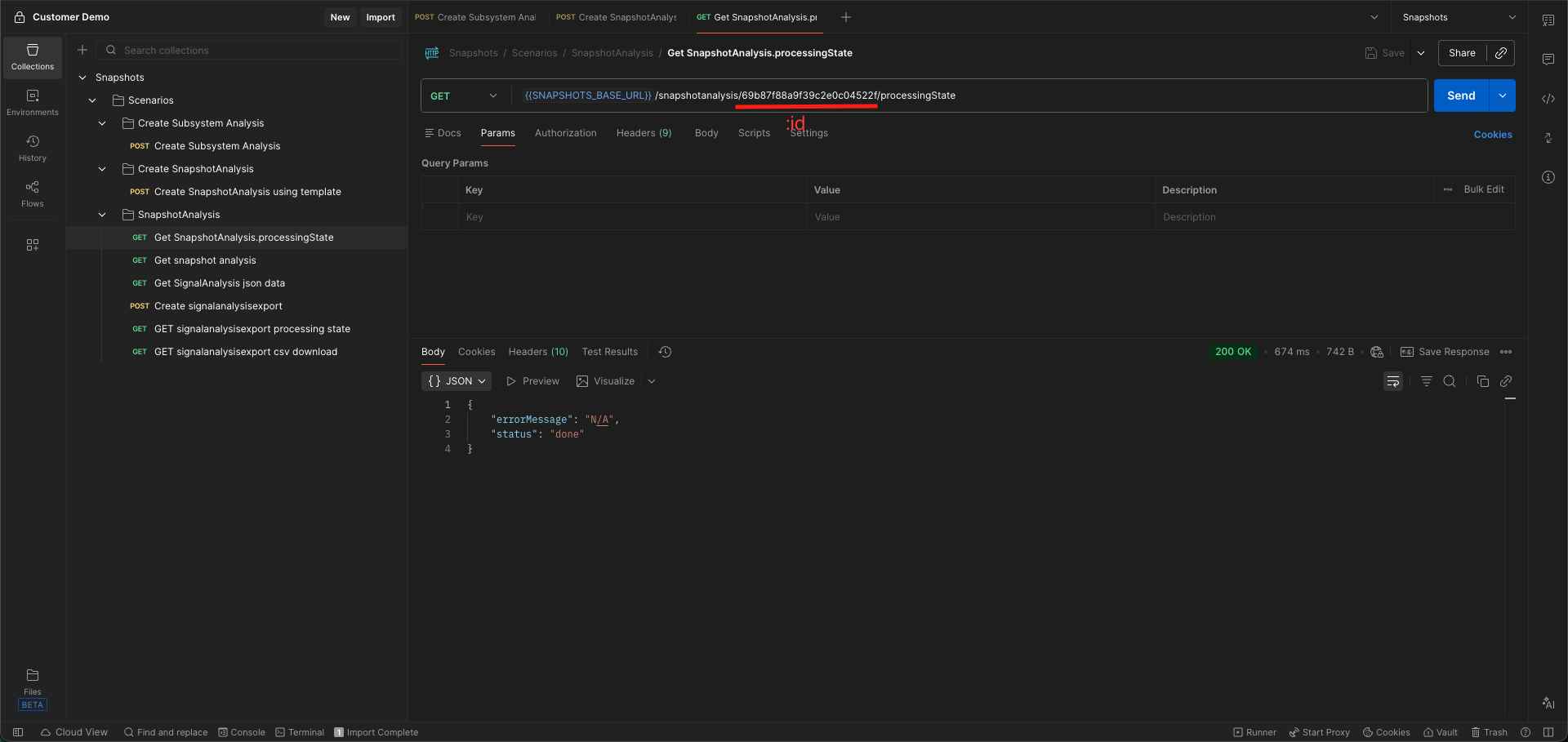
Once the SnapshotAnalysis reference exists. We can poll for the SnapshotAnalysis processing state using GET /snapshotanalysis/:id/processingState.
Replace the :id in the path with the SnapshotAnalysis id received in the response from creating the resource.
Request
Response
{
    "status": "done",
    "errorMessage": "N/A"
}
Once the processingStatus.status is "done", we can fetch the results of the SnapshotAnalysis resource using GET /snapshotanalysis/:id.
The SnapshotAnalysis resource
GET /snapshotanalysis/:id. Once a SnapshotAnalysis resource is done processing, the resource will contain a reference to a SignalAnalysis resource.
{
    "id": "69b87f88a9f39c2e0c04522f",
    "processingState": {
        "errorMessage": "N/A",
        "status": "done"
    },
    "signalAnalysis": {
        "id": "69b87f89e2c730b76d12b76f", <- reference to the SignalAnalysis resource created as a result of processing the SnapshotAnalysis inputs.
        "name": "Customer Demo In Use",
        "ownerId": "9766b1e3-7669-4b8b-a331-638b3cddc843",
        "processingState": {
            "errorMessage": "N/A",
            "status": "done"
        },
        "publicFlag": false,
        "signalExpressions": {
            "expressions": [
                {
                    "expression": "c125700",
                    "key": "c125700",
                    "name": ""
                },
                {
                    "expression": "c125698",
                    "key": "c125698",
                    "name": ""
                },
                {
                    "expression": "c125698 * 1",
                    "key": "s2",
                    "name": "in_use_egr_vvt_ratio"
                },
                {
                    "expression": "c1251",
                    "key": "c1251",
                    "name": ""
                },
                {
                    "expression": "c1251 * 1000",
                    "key": "s1",
                    "name": "custom_synthetic_*1000"
                },
                {
                    "expression": "c125700 * 1",
                    "key": "s3",
                    "name": "in_use_ds02_b1_ratio_synthetic"
                }
            ]
        }
    },
    "template": {
        "createdBy": "",
        "criteria": {
            "snapshotCriteria": {
                "idSnapshot": 25113,
                "maxEpochMs": 1773719999999,
                "minEpochMs": 0
            },
            "vehicleCriteria": {
                "fleets": null,
                "idPackages": null,
                "idVins": null
            }
        },
        "id": "69b87f88a9f39c2e0c04522e",
        "lastUpdate": 1773698952000,
        "name": "Customer Demo In Use",
        "public": false,
        "sections": [],
        "signalExpressions": {
            "expressions": [
                {
                    "expression": "c1251 * 1000",
                    "key": "s1",
                    "name": "custom_synthetic_*1000"
                },
                {
                    "expression": "c125698 * 1",
                    "key": "s2",
                    "name": "in_use_egr_vvt_ratio"
                },
                {
                    "expression": "c125700 * 1",
                    "key": "s3",
                    "name": "in_use_ds02_b1_ratio_synthetic"
                }
            ]
        },
        "subsystem": "In Use"
    }
}
Next steps after we have a SnapshotAnalysis resource with a processingState.status of "done" is to use the SignalAnalysis resource to retreive the signal data.